The Ultimate Weekly Blog Planner: Your Blueprint for Consistent Content Success
For any blogger, content creator, or digital marketer, the dream is a steady stream of high-quality posts and a thriving, engaged audience. The reality, however, often feels like a chaotic scramble of ideas, deadlines, and forgotten social media updates. The bridge between that dream and reality is a robust system—a tool designed not just to capture thoughts, but to transform them into action. This is where a dedicated Weekly Blog Planner becomes indispensable.
Why Planning Isn’t Optional in Modern Blogging
Blogging has evolved from a casual hobby into a strategic content engine for businesses, brands, and personal ventures. Readers expect consistency, and platforms reward regularity. Trying to manage this without a framework is like building a house without blueprints. A structured Blogging Planner serves as your blueprint. It moves you from reactive posting ("What should I write today?") to proactive publishing ("Here’s the excellent post I planned to share this week."). This shift is critical for SEO, as search engines favor fresh, consistent content from authoritative sources. A planner helps you build that authority systematically.
The mental clutter of juggling topics, keywords, promotion tasks, and deadlines can stifle creativity. A planner externalizes that clutter, freeing your mind to focus on the actual creative work: writing, researching, and connecting with your audience. It turns the administrative overhead of blogging into a simple checklist, making the process sustainable and far less daunting.
Anatomy of an Effective Weekly Blog Post Planner
Not all planners are created equal. A tool that genuinely organizes your workflow must cater to the multifaceted nature of a blogger’s week. Let’s break down the core features that make a planner truly useful.
Centralized Post Planning & Detail Tracking
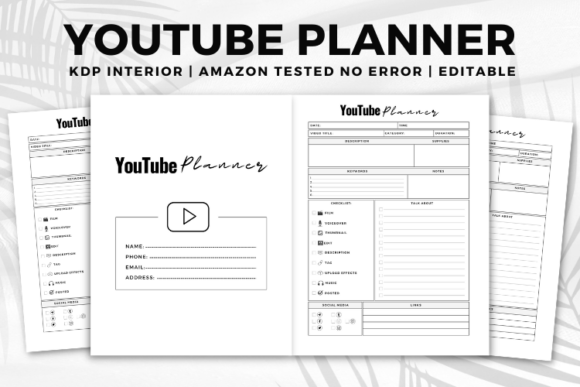
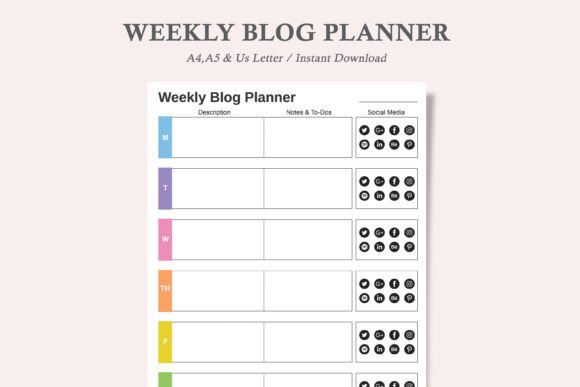
The heart of any Weekly Blog Planner is space to outline your posts. This goes beyond a simple title. Effective sections allow you to detail the target keyword, the post’s core purpose, key points to cover, and any research notes or links needed. This pre-writing work ensures each post is purposeful and aligned with your content strategy before you even write the first sentence.
Many planners also include a "To-Do" list for each post. Is a graphic needed? Do you need to interview someone? Should you find a specific statistic? Listing these micro-tasks prevents last-minute panic and breaks the post creation into manageable steps.
The Social Media Integration Circle
Writing a great post is only half the battle. Promotion is the other half. A modern Blogging Planner innovates by often including visual, check-off circles for various social media platforms—think icons for Facebook, Instagram, Twitter, Pinterest, or LinkedIn. After you publish, you can immediately check the corresponding circle. This provides a satisfying, visual confirmation that you’ve completed the promotional cycle for that post. It’s a simple feature that dramatically increases accountability and ensures your content gets the visibility it deserves.
This system is perfect for planning more than one post per day. You can clearly map out which posts will be promoted on which channels and on what days, preventing overlap or promotional fatigue for your followers.
Key Qualities: User-Friendly, Flexible, and Adaptable
The best tools adapt to you, not the other way around. When evaluating a Weekly Blog Post Planner, three practical qualities stand out.
1. User-Friendly Design: A clean, minimalist, and intuitive layout is paramount. The focus should be on your content plan, not on navigating a complicated interface. A professional, ink-friendly design also means if you print it, it looks sharp and won’t drain your printer ink with unnecessary graphics.
2. Both Printable AND Editable: This duality is crucial. The printable PDF format offers a tactile, offline planning experience—many creators find brainstorming and sketching plans on paper more freeing. The editable digital PDF, however, caters to the digital-native workflow. You can type directly into the planner on your tablet or computer, save it, and update it seamlessly. This hybrid approach respects different working styles.
3. Plenty of Space to Write: Even within an editable digital file, having ample physical space in the design ensures comfort. If you prefer to print and handwrite your notes, you won’t feel cramped. The planner accommodates your method, whether it’s typed bullets or handwritten scrawls and doodles.
Integrating the Planner Into Your Weekly Workflow
How do you actually use this tool? Imagine starting your content week on a Monday morning. You open your Weekly Blog Planner—perhaps the A4 size for a larger view on your desk or the A5 tucked into a notebook. You review the week’s overarching theme or campaign. You then slot in your primary post for Tuesday, detailing its keyword and main points. You see Wednesday is open, so you plan a shorter, supplemental post or a content update. You add the to-dos: "find case study image" for Tuesday’s post, "update meta description" for an older post.
As you complete each post, you not only mark the post done, but you also check off those social media circles. By Friday, your planner is a testament to a week of executed strategy, not just a list of intentions. This visual record is motivating and provides a valuable archive of what you accomplished, which can inform future planning.
A Tool for Solo Bloggers and Teams
While ideal for the individual creator, this planner style also scales. For a small content team, a printed or shared editable Blogging Planner can serve as a central communication hub. Everyone can see the week’s content lineup, who is responsible for which promotional task, and what stage each post is in. It reduces meeting time and creates clear accountability.
Choosing Your Planner Format: PDFs and JPEGs
Many comprehensive planner packages, like the example described, include multiple file types. The 3 PDFs (US Letter, A4, A5) cater to different international paper standards and personal size preferences. The accompanying JPEG versions offer flexibility; they can be used as background images in note-taking apps, uploaded to digital whiteboards, or even embedded in other project management tools. This variety ensures you can integrate the planner into almost any digital or analog system you already use.
The "print a new page every time you need more" philosophy is empowering. It’s not a fixed, one-time journal. It’s a reusable template. You download it once and have a perpetual supply of fresh planning sheets, adaptable to any week, any project, or any content surge.
Ultimately, a great Weekly Blog Planner is more than a sheet of paper or a digital file. It’s a commitment device. It’s a practical scaffold that supports the weight of your content ambitions, transforming the chaotic art of blogging into a manageable, consistent, and successful practice. By providing space for detail, to-dos, notes, and that crucial promotional checklist, it turns planning from a chore into the foundational step for every piece of content you proudly publish.